Friday, March 2, 2012

Blog Yahyagan New Look

Hai guys, my followers, my subscriber and somewho which read this article on my blog. Today i've completed my project, just my small project. Ya i've finished my own template, its my first template! Do you like it? Blog Yahyagan New Look

Homepage

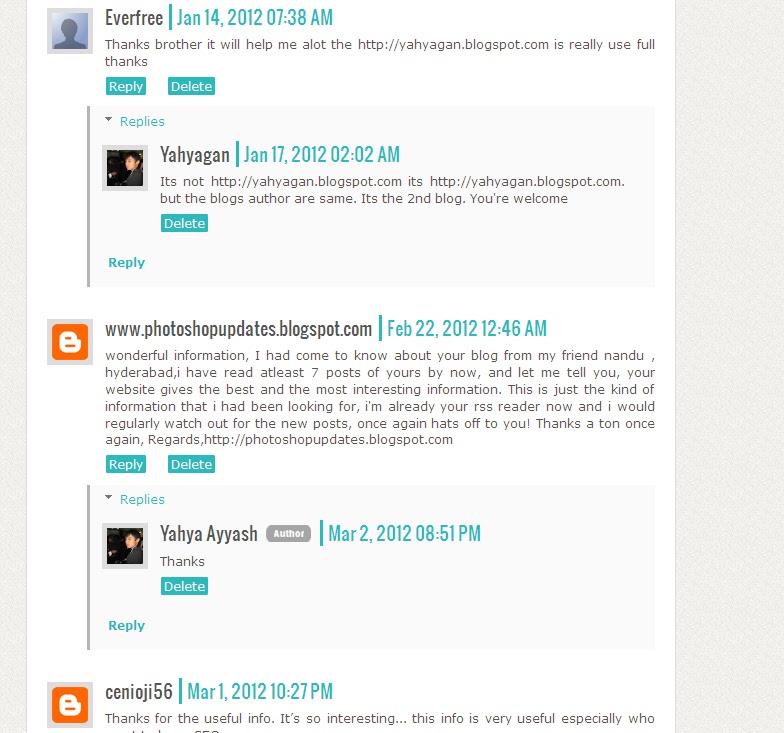
Comment Page
And i'm very love the comment page, why? because i think it look like wordpress haha. I love blogger interface and feature. But i think wordpress interface are better, so i want a blogger template but the user interface is like wordpress. Finally i can do it!!
Template Information
Template name : Yahyagan
Author : Yahya Ayyash
Author URL : http://blogyahyagan.blogspot.com
And now i will publish this template to you. Hmm but sorry because i've spent my time to create and redesigned this template, so isnt free. But its always cheap.
Just US$ 3.00 
and US$ 1.50 if you've like my fanpage, subscribe my feeds and follow my blog. (Just sent an e-mail to me yahyaganblog@gmail.com to verify that you've done).
Template Feature
  • 1 Column Sidebar
  • Wordpress Style on Comment Page
  • 4 Column Footer
  • SEO Friendly
  • Breadcrumbs
  • Beautiful Subscribe Box
  • Ads Ready
  • jQuery Tabs Widget
  • Etc.
Thanks for be my subscriber or followers, btw i will give this template FOR FREE just for 3 person. Contact me ok?
Next post Docked Sidebar Gadget on Blogger Dynamic View
Read More Blog Yahyagan New Look

Easy Way To Find .Edu Dofollow Blog With Your Own Niche

Easy Way To Find .Edu Dofollow Blog With Your Own Niche
.Edu site is the best way to increase your visitor? Why? Because .edu or .gov blog is the high authority domain from google. Its too hard if you want to got that domain. So if you got an backlink from .Edu site, it will help you to increase your pagerank.
And how to got .edu backlink?
Just make a search on google LoL.
I'am sure, just a make a search on google with this keyword below : 
your keyword site:.edu inurl:blog "post a comment" -"you must be logged in" 
Replace the "your keyword" word with your own keyword.
Or You want to got .gov backlink?
Make this search on google
your keyword site:.gov inurl:blog "post a comment" -"you must be logged in"
Replace the "your keyword" word with your own keyword.
Ok maybe thats it, now you can commented on .edu or .gov blog, but remember!! Dont Do SPAMMING!!!
Ok thanks 
Next post Top 5 BuySellAds Alternative
Easy Way To Find .Edu Dofollow Blog With Your Own Niche
Read More Easy Way To Find .Edu Dofollow Blog With Your Own Niche

10 Tips To Increase SERP On Google

Google is the most popular search engine over the world. So if you want to optimized your revenue from the internet bussiness, you must optimize your SERP on Google. And How to Increase SERP On Google?
So This is it 10 Tips To Increase SERP On Google

Google isn’t going to notice you and give you automatic top billing just because you want it. It’s a long way to the top if you want to rock n’ roll (with Google). If you’re ready to start So, here are ten things you can do to help get noticed by Google.
Below 10 Tips Are Surely Increase  Your Blog’s Search Ranking :
1. Make the URL of your web pages search engine friendly. That means use dashes between your words in the URL. Example: http://www.dailyblogtools.com/search-engine-friendly-page/
2. Link to the exact same domain every time. Don’t link to www.abc.com, link to http://www.abc.com. Be consistent in your linking, as Google treats these as two different domains.
3. Avoid getting sandboxed by Google by building links up slowly. Too many links too fast can result in penalization of your website, and worse yet, it can disappear forever.
4. Use social networking to promote your website. Social networking sites like Facebook and Twitter are now being counted as links in some manner, if they point towards your website. This doesn’t mean that you should spam your profile or fan page with links, but an every now and then link wouldn’t hurt.
5. Use RSS feeds to get deep links. If you have a blog, generate an RSS feed and see if you can get some quality backlinks through these RSS feed submissions.
6. Concentrate on targeted web traffic as opposed to general web traffic. This will engage readers further, and they’ll spend longer on your page. This could lead to more links, sales, and even more traffic.
7. Create a site map and submit it to Google. This will tell Google about every web page that your site has to offer, but won’t guarantee they will all be indexed.
8. Try to attract traffic through images. Google’s image search is a top source of traffic for many webmasters. Optimizing your site images can help Google tell what your images are, and you might get some additional traffic and links in the process.
9. Submit your website to web directories. Submitting your website to high quality directories are sometimes not free, but can help with search engine rankings. Your link will be placed into the category that it is most relevant, or you will find the category that is most suiting for your site.
10. Research keywords. Keyword research can help you rank better in Google through some simple, free tools available. The Adwords Keyword Tool is one way to get a list of keyword phrases to include in your website.
I Hope You Are Enjoyed This Article.I Think Above 10 Tips Are Help You To Increase Your Website Search Ranking In Google.
Next post Easy Way To Find .Edu Dofollow Blog With Your Own Niche
Source : Dailyblogtools
Read More 10 Tips To Increase SERP On Google

Top 5 BuySellAds Alternative

Instead google adsense, buysellads is the second website that can give you a lot of revenue from online advertising. But its very hard to get your website approved on buysellads, especially for .blogspot.com domain.
If you want your website to get approved on buysellads, you must have your own domain, not .blogspot.com. So if your domain is .blogspot.com, i will share to you this "Top 5 BuySellAds Alternative Website"

BuySellads approval ? is you are failed in BuySellAds Approval ! its time to try some similar websites like buysellads online  advertising networks (alternatives for buysellads) .
Top 5 Similar Websites Like BuySellAds.com {Online Advertising} websites similar buysellads alternatives advertising networks

5 Similar Websites Like BuySellAds.com

1. Advertise Space (similar website like buysellads)
Top 5 Similar Websites Like BuySellAds.com {Online Advertising} websites similar buysellads alternatives advertising networks
advertise space is one of the best alternative/ similar website like buysellads advertising network.
The Easiest Self-Serve Online Advertising PlatformBuy and Sell ads on your website, blog, or iPhone app. Gain exposure by having your site featured in our premium ad buyer directory.
Link : http://www.advertisespace.com/

2.Puxee (similar website like buysellads)
Top 5 Similar Websites Like BuySellAds.com {Online Advertising} websites similar buysellads alternatives advertising networks
Puxee also one of the best advertising network.its also one of the similar website like buysellads.com .Puxee is a new up-and-coming advertising network that is hoping to fulfill all the needs of advertisers and publishers.
Link : http://www.puxee.com/
 3.Adsella (similar website like buysellads)
Top 5 Similar Websites Like BuySellAds.com {Online Advertising} websites similar buysellads alternatives advertising networks


AdSella takes 20% revenue commission and allows the subdomain blogs (Blogspot.com).its also one of the best alternative for buysellads .
Link: http://www.adsella.com/
4.Blogads (similar website like buysellads)
One of the oldest ad network. BlogAds takes 30% revenue commission. It allows the text ads and you can select out of 3 types of account depending on your blog traffic.its also one of the similar website like buysellads.
Link : http://blogads.com/
5.OIO Publisher (similar website like buysellads)
It is an another BuySellAds alternative which works in a different way. You will have to install a feature rich plugin on your blog and after that it will take care of all advertisement related issues.so this is also one of the similar website like buysellads online advertising.
Link: http://www.oiopublisher.com/
Hope you are enjoyed reading,
Source : Daily Blog Tools 

Next Post 10 Tips To Increase SERP On Google

Top 5 similar websites like buysellads

Read More Top 5 BuySellAds Alternative