Showing posts with label SERP. Show all posts
Friday, March 2, 2012

10 Tips To Increase SERP On Google

Google is the most popular search engine over the world. So if you want to optimized your revenue from the internet bussiness, you must optimize your SERP on Google. And How to Increase SERP On Google?
So This is it 10 Tips To Increase SERP On Google

Google isn’t going to notice you and give you automatic top billing just because you want it. It’s a long way to the top if you want to rock n’ roll (with Google). If you’re ready to start So, here are ten things you can do to help get noticed by Google.
Below 10 Tips Are Surely Increase  Your Blog’s Search Ranking :
1. Make the URL of your web pages search engine friendly. That means use dashes between your words in the URL. Example: http://www.dailyblogtools.com/search-engine-friendly-page/
2. Link to the exact same domain every time. Don’t link to www.abc.com, link to http://www.abc.com. Be consistent in your linking, as Google treats these as two different domains.
3. Avoid getting sandboxed by Google by building links up slowly. Too many links too fast can result in penalization of your website, and worse yet, it can disappear forever.
4. Use social networking to promote your website. Social networking sites like Facebook and Twitter are now being counted as links in some manner, if they point towards your website. This doesn’t mean that you should spam your profile or fan page with links, but an every now and then link wouldn’t hurt.
5. Use RSS feeds to get deep links. If you have a blog, generate an RSS feed and see if you can get some quality backlinks through these RSS feed submissions.
6. Concentrate on targeted web traffic as opposed to general web traffic. This will engage readers further, and they’ll spend longer on your page. This could lead to more links, sales, and even more traffic.
7. Create a site map and submit it to Google. This will tell Google about every web page that your site has to offer, but won’t guarantee they will all be indexed.
8. Try to attract traffic through images. Google’s image search is a top source of traffic for many webmasters. Optimizing your site images can help Google tell what your images are, and you might get some additional traffic and links in the process.
9. Submit your website to web directories. Submitting your website to high quality directories are sometimes not free, but can help with search engine rankings. Your link will be placed into the category that it is most relevant, or you will find the category that is most suiting for your site.
10. Research keywords. Keyword research can help you rank better in Google through some simple, free tools available. The Adwords Keyword Tool is one way to get a list of keyword phrases to include in your website.
I Hope You Are Enjoyed This Article.I Think Above 10 Tips Are Help You To Increase Your Website Search Ranking In Google.
Next post Easy Way To Find .Edu Dofollow Blog With Your Own Niche
Source : Dailyblogtools
Read More 10 Tips To Increase SERP On Google
Friday, February 3, 2012

High Pagerank Dofollow Social Bookmarking Site 2012

Publish an or some article on Social Bookmarking is a great way to incresase your blog traffic, and if the social bookmarking site that you publish your article is dofollow, you'll get backlink from them. So publish or share an article on the High Pagerank Dofollow Social Bookmarking Site will be increase your traffic and you'll got backlink for increase your SEO from them.

Social bookmarking is a great way for internet user to share, organize, or promote their article.

There a hundred or thousand social bookmarking site, some of them have a good pagerank and dofollow. So now i will share a list of High Pagerank Dofollow Social Bookmarking Site 2012

High Pagerank Dofollow Social Bookmarking Sites

Page Rank 8

Reddit.com
folkd.com

Page Rank 7

EbaumsWorld.com
propeller.com
metafilter.com
care2.com
connotea.org
tipd.com

Ok maybe thats it, but if you know more Dofollow Social Bookmarking Site With High PR, lets tell me by give comment on this post. Thanks

Next post "5 Effective Tips To Boost Your Traffic"
Source : btips.net
Read More High Pagerank Dofollow Social Bookmarking Site 2012
Saturday, January 28, 2012

5 Effective Tips To Boost Your Traffic

After few days i haven't update this blog now i will share a pretty article to you "7 Effective Tips To Boost Your Site Traffic". Maybe if you're a newbie blogger like me, you are confused how to get a lot of traffic. Maybe i dont know how, so now my blog visitor just 20/day. But its doesn't matter because i'm to lazy to do this tips. So if you do this tips to your blog, and do this frequently i think your visitor will increases up to 200%. So just do this tips below :

1. SEO Your Blog
SEO or Search Engine Optimization, by optimize your site on the search engine and make your site to the top result on the search engine you'll get a lot of traffic. 50% people make google as a homepage on their browser, and if they type your keywords and make a search on the search engine (Google) I promise, your traffic will be increased.
2. Update Your Blog Frequently
Quality still reigns over quantity, so don't over do it. Every blogger want repeat visitor/loyal visitor. Not just new one who stop visiting if they get put off by the quality of the article on your website. So update your blog frequently, with the high quality article.
3. Optimize Social Media Network
I think almost everyone have a Facebook and/or Twitter account. There is so many that you can reach out there (Social Media). So if you optimize your social media network, it very effective to increase your loyal visitor/subscriber of your site.
4. Comment on Others' Blogs
If you visit other blogs and that blog has a lot of visitor and high Page Rank. I think leave a comment on that Blog is a good way to increase your visitor. So leave your opinions about an article on that blog in the comment box. And encourage the readers to visit your own blog.
5. Build a Blogging Network
Bloggers are a close-knit community. they support and help one another in the blogosphere. So if you're known to each other and visit his/her blog, he/she is likely return the favor and visit your's too.

Ok maybe thats it, 5 effective ways to Boost Your Site Traffic 
Next post "Top 20 Google Adsense High Paying Keywords 2012"
Source : hellboundbloggers
Read More 5 Effective Tips To Boost Your Traffic
Friday, January 13, 2012

Create Google Breadcrumbs On Blogger

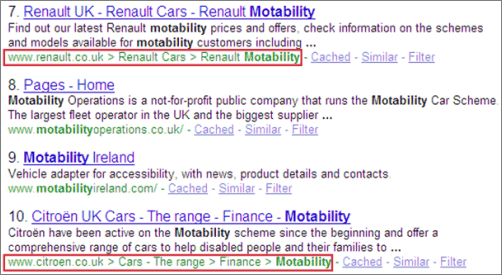
Create google breadcrumbson blogger, show breadcrumbs on google result page, Google Breadcrumbs On SERP.
Hai guys, maybe if you are my blog followers you knew that i have shared a post like this post title. But youre wrong! Its true if you think i've create another post about breadcrumbs navigation, and what the different on this post? Just the google word before the breadcrumbs? Yeah youre right. So now we will learn how to create google breadcrumbs on blogger.
I will tell you what the different.
Its called Breadcrumbs Navigation
And this is Google Breadcrumbs
So, know we know that if we had put the google breadcrumbs code on our website. We'll find the breadcrumbs that we put on our website on the Search Engine Result Page, its make your visitor easier to find any post on your website. And its will make Spider Bot easier to crawl your website. So it will increase your SERP.
Ok now lets we started the way to Create Google Breadcrumbs On Blogger.

1. Login to blogger
2. Design - Edit HTML - Expand widget template
3. Find this code on your template
<b:include data='top' name='status-message'/>
 And then paste this code below after that code.
<b:include data='posts' name='breadcrumb'/>
4. Ok, after that lets find this code
<b:includable id='post' var='posts'>
And than replace that code with this code below
<b:includable id='breadcrumb' var='posts'>
<b:if cond='data:blog.homepageUrl != data:blog.url'>
<b:if cond='data:blog.pageType == &quot;static_page&quot;'>
<div class='breadcrumbs'><span><a expr:href='data:blog.homepageUrl' rel='tag'>Home</a></span> &#187; <span><data:blog.pageName/></span></div>
<b:else/>
<b:if cond='data:blog.pageType == &quot;item&quot;'>
<!-- breadcrumb for the post page -->
<b:loop values='data:posts' var='post'>
<b:if cond='data:post.labels'>
<div class='breadcrumbs' xmlns:v='http://rdf.data-vocabulary.org/#'>
<span typeof='v:Breadcrumb'><a expr:href='data:blog.homepageUrl' property='v:title' rel='v:url'>Home</a></span>
<b:loop values='data:post.labels' var='label'>

 &#187; <span typeof='v:Breadcrumb'><a expr:href='data:label.url' property='v:title' rel='v:url'><data:label.name/></a></span>

</b:loop>
 &#187; <span><data:post.title/></span>
</div>
<b:else/>
<div class='breadcrumbs'><span><a expr:href='data:blog.homepageUrl' rel='tag'>Home</a></span> &#187; <span>Unlabelled</span> &#187; <span><data:post.title/></span></div>
</b:if>
</b:loop>
<b:else/>
<b:if cond='data:blog.pageType == &quot;archive&quot;'>
<!-- breadcrumb for the label archive page and search pages.. -->
<div class='breadcrumbs'>
<span><a expr:href='data:blog.homepageUrl'>Home</a></span> &#187; <span>Archives for <data:blog.pageName/></span>
</div>
<b:else/>
<b:if cond='data:blog.pageType == &quot;index&quot;'>
<div class='breadcrumbs'>
<b:if cond='data:blog.pageName == &quot;&quot;'>
<span><a expr:href='data:blog.homepageUrl'>Home</a></span> &#187; <span>All posts</span>
<b:else/>
<span><a expr:href='data:blog.homepageUrl'>Home</a></span> &#187; <span>Posts filed under <data:blog.pageName/></span>
</b:if>
</div>
</b:if>
</b:if>
</b:if>
</b:if>
</b:if>
</b:includable>
5. If you want to customize your breadcrumbs design, and want to your breadcrumbs design look like appear on my website. You can put this code below before code
.breadcrumbs {border: 1px solid #c1c1c1; background:#f1f1f1; font-family: 'Yanone Kaffeesatz', arial, serif; color:#999999; font-size: 15px; padding: 10px; margin-bottom: 10px;}
And then paste this code below after <head> code
<link href='http://fonts.googleapis.com/css?family=Yanone+Kaffeesatz' rel='stylesheet' type='text/css'/>
 6. Last step is save your template.
Ok thats its, i hope this tutorial will be useful for you. How to Create Google Breadcrumbs On Blogger
Next post "20 Best Font For Web Designer"
Read More Create Google Breadcrumbs On Blogger
Friday, December 23, 2011

3 Ways To Increase Your Visitor

Hai guys, ok in this time i will share some tips to you, tips how to increase your visitor. Not a traffic exchange, and not a SPAM. Not a blacklisted ways but we will do it with a White Hat SEO ways, not a simple way but not a difficult way too. The way that can increase your visitor, not a BOT visitor but a real human that maybe will interest if they looking your ads. The loyal visitor too your blog. The loyal visitor that will subscribe your blog, the loyal visitor that will visit your blog every time you updated it. The loyal visitor that will support you everytime. So what is the way? Ok lets we started it
3 Ways To Increase Your Visitor
1. Unique Content, every blog must have an Unique Content. If your blog filled by 90% Unique and Original content. I guess that your blog has unique visitor/day up to 1000 visitor/day. Content is the king, if your blog have a good design, template and good navigation. And you've promote your blog to any website but all of your content are Copy-Paste from other website! I think many people wouldnt visit your blog, because they has read a same article on other website.
So remember you must have an Unique Content on your Blog.
2. Promote It, if your blog have a good and unique content, and original content, good navigation, good User Interface design but you doesnt promote it. Promote to any website, blog walking? Adding your site to search engine? Adding your site to social bookmark? And others site? How you can get visitor? How others people can knew about your blog? Know about your blog content? And remember, if you promote it by commenting on others blog. Dont do SPAM
So you must promote your blog.
3. User Interface Design, and the last tips from me is your blog must have an Interactive Blog Design. Not how search engine looking your website, but how others people looking your site. If some people are interest with your blog design, maybe she/he will subscribe your blog, will follow your blog. Why? Because she/he is interested to your blog, and she/he want to learn how to create a Wonderful Blog Like this? And people wil enjoyable while they read an article on your blog. So it will decrease your bounce visitor.
Lets Spice Up Your Blog Design
For the last step, you can follow my blog or subscribe it. I will share awesome web design tutorial everytime. So lets subsrcibe my blog, by filling a form below every post.
Ok now, you've read my short article. And now you must try that. I hope it working for you
3 Ways To Increase Your Visitor
lets see next post, How to increase your page rank "Dofollow blog list 2012"
Read More 3 Ways To Increase Your Visitor
Wednesday, December 21, 2011

How To Create SEO Friendly Sitemap For Blogger

Today i will share a tutorial to increase your Page Rank and SERP. How to do that? You must create a sitemap, its very easy when you use Wordpress for your site. But if you use blogger, maybe it not easy as Wordpress.
So now, i will give you a tutorial how to create SEO friendly Sitemap For Blogger.

1. Login to blogger
2. Posting - Create a New Page
3. Click edit HTML page and give "Sitemap" as the page title
4. Just paste this code
<script src="http://yourjavascript.com/18113981113/bukarahasiablog-toc.js">
</script>
<script src="http://yahyagan.blogspot.com/feeds/posts/default?max-results=9999&amp;alt=json-in-script&amp;callback=loadtoc">
</script>
5. Change http://yahyagan.blogspot.com with your own url.
6. Publish your page and dont forget to ping it
Ok thats it, very simple? But it can increase your page rank and SERP.
Thanks for visit my blog guys. How To Create SEO Friendly Sitemap For Blogger
Like this article? Lets subscribe my blog below, many great blogging tips in this blog. Like this post "How To Create a Simple and beautiful  Subscription Box"
Read More How To Create SEO Friendly Sitemap For Blogger
Tuesday, December 13, 2011

Breadcrumbs Navigation The Simple Way To Increase Your SERP

Do you know breadcrumbs?
Breadcrumbs typically appear horizontally across the top of a web page, usually below title bars or headers. They provide links back to each previous page the user navigated through to get to the current page or—in hierarchical site structures—the parent pages of the current one. Breadcrumbs provide a trail for the user to follow back to the starting or entry point. A greater-than sign (>) often serves as hierarchy separator, although designers may use other glyphs (such as » or ›), as well as various graphical treatments.
Typical breadcrumbs look like this:
Home page > Section page > Subsection page
or
Home page : Section page : Subsection page
And many people has create a breadcrumbs navigation for them blog, and itsvery effective to increase your SERP. So many visitor can come to your blog. And now i will give you a tutorial how to create a breadcrumbs on your blog.

1. Login to blogger
2. Layout - Edit HTML - Expand Widget Template
3. Find this HTML code
<b:if cond='data:post.title'>
4. After that paste this HTML code, after that code
<!-- Navigasi Breadcrumb Start -->
<b:if cond='data:blog.pageType == "item"'>
<a href='http://yoursitename.com/'>Home</a> &#187;
<b:if cond='data:post.labels'>
<b:loop values='data:post.labels' var='label'>
<a expr:href='data:label.url' rel='tag'><data:label.name/></a>
<b:if cond='data:label.isLast != "true"'>,</b:if>
</b:loop>
&#187;
</b:if>
<data:post.title/>
</b:if>
<!-- Navigasi Breadcrumb Stop -->
6. Change the "yourblogname.comm" with your blog name/url
7. Finally, save your template.
8. And you can see the breadcrumbs navigation on the top of your Article title

Lets see How To Create Beautiful 3 Column Footer
Source :
http://belajarbisnisonlines.blogspot.com/2010/11/cara-membuat-navigasi-breadcrumb-di.html
http://en.wikipedia.org/wiki/Breadcrumb_%28navigation%29
37A8GKRJWPTX
Read More Breadcrumbs Navigation The Simple Way To Increase Your SERP